
Deploy Redis
Import Redis Helm Chart and Deploy to Cluster
- Follow the same steps used for the Dapr deployment to import this Redis helm chart into Meshery and deploy.
- Click Actions to deploy, then click Open In Visualizer.
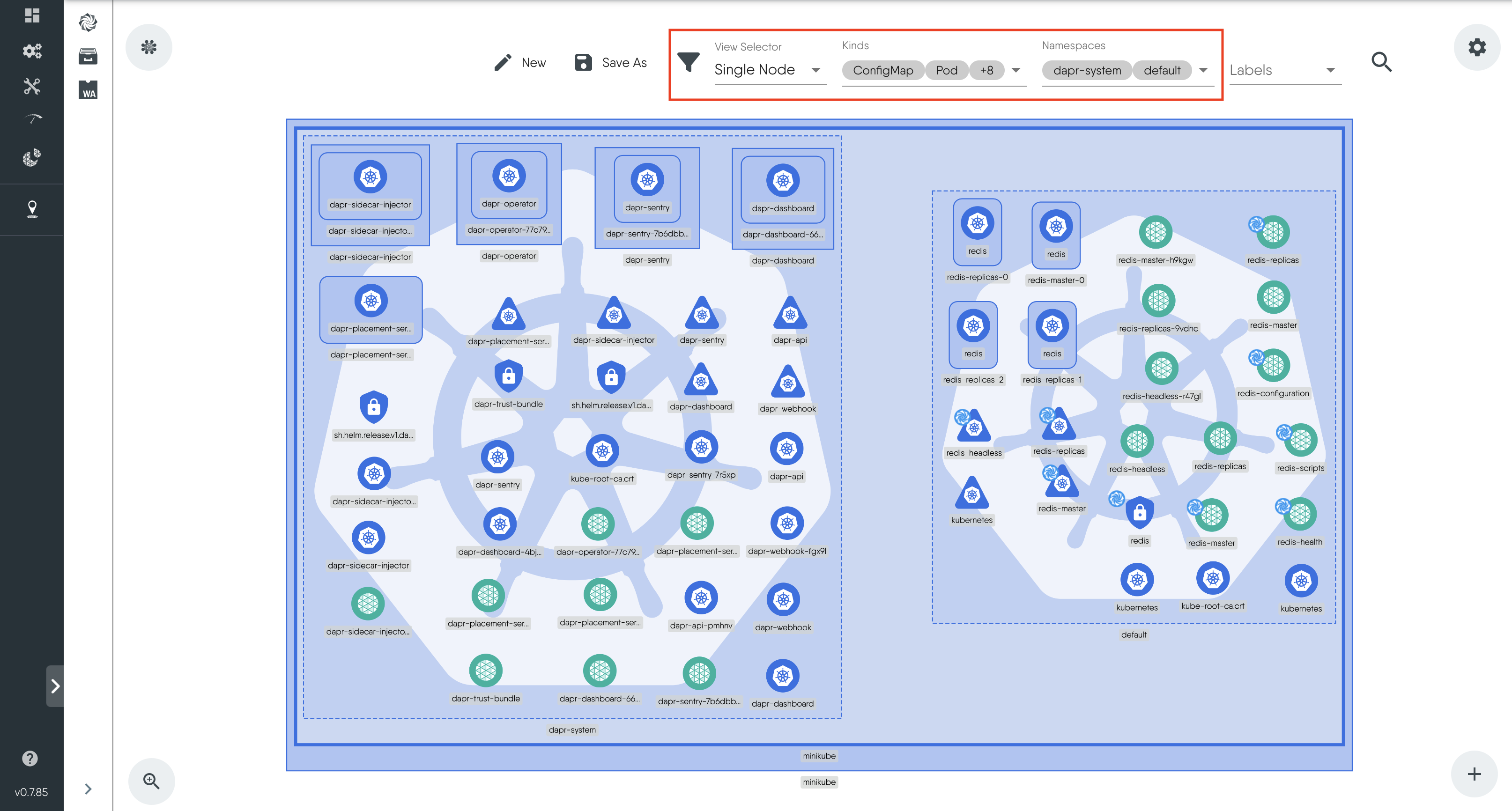
- In Visualizer mode, use the filter to adjust the views of the resources in the cluster.
- For View Selector select Single Node.
- For Kinds select the resources you want to see including Deployments,Pods, Services, Statefulset, Secret, Replicaset, Endpoints and Endpoint slices.
- For Namespaces select dapr_system and default.
These filter settings will allow you to view both Dapr resources within the dapr-system namespace and Redis resources within the default namespace.
Next, let's deploy the Dapr state store component that will manage this Redis state store.


Layer5 is the steward of Meshery and creator of Kanvas, the collaborative canvas for cloud-native infrastructure. We bridge the gap between design and operation, allowing engineers to create, configure, and deploy orchestratable diagrams in real time. Whether managing Kubernetes or multi-cloud environments, Layer5 provides the tooling needed to oversee modern infrastructure with confidence.